tech support 1

  • Subscribe to our RSS feed.
  • Twitter
  • StumbleUpon
  • Reddit
  • Facebook
  • Digg

Friday, 17 May 2013

Wonderopolis - free resource for find the answers to what students wonder

Posted on 12:47 by Unknown


Wonderopolis is a great, free resource that has some great resources to help students learn and explore all kinds of topics. It has topics ranging from the science of why the sky is blue to how sound effects are made to pretty much any question, or "wonder" a child has.

There are quizzes to help reinforce knowledge and connect to related ideas, mobile design and navigation, social networking features, ways for users to share ideas, and over 900 different topics of wonder.

Some ways Wonderopolis is used:
Wonderers include teachers, students and parents wondering about the world around them in a variety of ways:
· A fifth grade teacher supplements classroom work to help her students develop authentic writing skills, critical thinking and expanded vocabulary
· A third grade class taps Wonderopolis while researching and writing papers
· The mother of a first grader spends early morning quality time with her son checking out the Wonder of the Day and exploring past Wonders
Take a look at it and use it with your students. Share it with your students and parents as a resource to use over the summer to continue learning and curiosity.

Wonderopolis is run by the National Center for Family Literacy and supported by the Verizon Foundation.
Read More
Posted in free resources | No comments

PBS KIDS' Design Squad Nation - great STEM resources and lessons

Posted on 12:34 by Unknown


PBS KIDS' Design Squad Nation is an Emmy Award winning program with STEM related videos, activities, games and an interactive community. There is also a Parents and Educators section with lesson plans, curriculum guides, and more. 

There are some great new features to it, including a Solar System unit with games, activities, and lesson resources about our solar system, a roller coaster project where students compete to build the best roller coaster out of poster board, and a variety of other resources. 

Topics include science, flying, hobbies, sports, and much more. 

This is a great, free resource for educators, parents and students and well worth the time to explore it. 


Read More
Posted in free resources, lesson plans, lesson resources, pbs, science, STEM | No comments

Wednesday, 8 May 2013

eduClipper social web clipper gets Updated with Some Great New Features

Posted on 06:57 by Unknown


educlipper


eduClipper is a great app from EduTecher Adam Bellow that provides a way to clip anything from the web and then share it with anyone.

It's free and allows you to clip and capture anything from the web including articles, links, videos, lesson plans and more. You then create a clipboard to organize what you have clipped and then you can share the clipboards with students, colleagues, the public or just keep it for yourself. Students can use it too and the clipboards are searchable. You can also share your clipboards via different social networks.

The social sharing aspect is what makes it different from other web clipping services and apps. You share what you have clipped with others and people can comment and discuss the clip.

It was recently updated with some great new features...


Teacher and Student Accounts : We are excited to announce teacher and student accounts. Teachers can easily set up classes of students and create eduClipboards of content to share with whole classes or groups of learners.
Teachers can also change settings to make eduClipper more or less restrictive for the whole class or individual learners based on school or classroom policies. There’s a lot there - and we really want to put you in the driver’s seat when it comes to how you wish to use a powerful tool like eduClipper with your kids.


                                                               New Bookmarking Tool : We are really proud of the new eduClip It button. This bookmarking tool lets you clip literally any type of content and bring it into eduClipper as an eduClip. It is smooth and fun to use!


Collaborative Clipboards : Sharing resources is great - but creating collaborative clipboards with users on a topic is an even better way to offer real-time collaboration in classes for students or teachers. Great for educators connecting with colleagues to create the ultimate resource board as well as for students to join each other and curate the best resources for academic or interest-based learning.

Citations : Being a “good digital citizen” starts with citing sources and we have worked with EasyBib to generate citations for all eduClipped web content. A quick and painless way to annotate your eduClips.
Those are just a few quick things - but in short... everything is 100% more awesome and we are excited to tell you that this is just the tip of the iceberg. We have a lot more up our sleeve and you should be on the lookout for more cool news soon.
Take a look at the new site and give it a shot - we know you will love it!
And if you have questions or comments - we are all ears!
eduClipper exists to help bring education forward and we are eager to hear your feedback.


Related:

EduTecher - explore and share educational web tools


Read More
Posted in educlipper, free resources, web clipping | No comments

Monday, 29 April 2013

StudyBlue announces annual teacher appreciation program “Thank a Teacher a Latte.”

Posted on 08:00 by Unknown


Mobile and social study platform, StudyBlue today announced the launch of its annual teacher appreciation program “Thank a Teacher a Latte.” As the largest digital library of peer-sourced study materials, StudyBlue is inviting students, parents and industry leaders nationwide to join in building a virtual Wall of Thanks to give back to the educators who have made a difference in their lives.

The 2013 Thank a Teacher a Latte program is open to everyone, including students, former students and parents. In addition, any teacher or school staff member may be recognized. With one click, a digital thank-you card is created and displayed as a keepsake. Once submitted, the esteemed educator will receive a digital “badge of honor” they can display with pride on Pinterest and other social media outlets. 300 lucky teachers will receive $5 coffee cards at the end of May when the contest subsides.

2012’s campaign saw thousands of submissions from cities and school districts across the country. Praise came from parents, students and a CEO or two “Educators are busy, and often don’t hear a simple “Thanks. With this platform we wanted to help students easily extend their gratitude to a teacher who is making, or has made, a difference in their educational goals,” said CEO Becky Splitt.

For more information on the program, to see all current Thank You Cards in real-time, visit http:/thankateacher.studyblue.com/ and www.studyblue.com.


Related:

StudyBlue - create and share flashcards, quizzes, and study guides


Read More
Posted in teacher appreciation | No comments

Friday, 26 April 2013

Quick and easy way to add memory to your Chromebook

Posted on 10:06 by Unknown


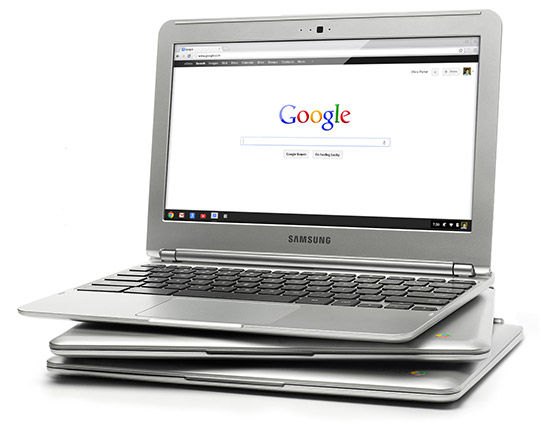
I've been using a Chromebook since getting a CR-48 from Google a few years ago, and I love it. I am currently using a Samsung Chromebook, and our district is deploying over 5000 of them.

The Chromebooks, and Chrome OS in general, are fast and work great, but every once in a while they can bog down when doing serious multitasking. Many only have 2GB of RAM and do not offer the ability to add more RAM physically. I found out about a great way to increase your memory by using zRam which uses swap space on your hard disk/SSD. Kevin C. Tofel shared this great resource that is very easy to do.

Here are the simple steps:

  1. Open up a terminal tab with the CTRL + ALT + T keys.
  2. Type “swap enable” (without the quotes).
  3. Restart your Chromebook.
It's that easy. I did it and my Chromebook runs much smoother and faster and rarely bogs down, even with 15+ tabs open. 

Disabling it is easy too. Do all of the steps but type "disable" instead of "enable".

Give it a try and see how it improves your Chromebook's performance. 


Related:

Chromebooks in Education: http://educationaltechnologyguy.blogspot.com/2012/05/new-chromebook-chromebox-and-updated.html


Read More
Posted in chromebooks, google | No comments

Google Keep, Google's Note Taking App, get's some improvements and new features.

Posted on 09:47 by Unknown


Google’s Keep, Google's easy to use note taking app, has some new features, improved features and bug fixes. Here is the list of new features from the Google Play Store.

• Create notes, lists, and audio notes
• Add photos to any note
• Hide and show checkboxes to turn notes into checkable lists
• View and create notes from homescreen and lockscreen widgets (lockscreen widgets require Android 4.2+)
• Selectable color for notes
• Safely sync notes to Google Drive and other devices
• Notes can also be used from http://drive.google.com/keep


I use Evernote for most things, but also use Keep for quick notes on the go, along with voice notes, and then I can share the notes to other apps, or just access them as needed.


Read More
Posted in Evernote, google, keep, notetaking | No comments

Thursday, 21 March 2013

Google Keep note taking service launched

Posted on 11:53 by Unknown

Google Keep

Google has just launched Keep, a note taking service, that is free. It is a cool note taking system, that allows you to quickly jot down notes, checklists, transcribe a voice memo, search your notes, and more.

Your notes are saved in Google Drive and synced to all of your devices. There is an Android app for Android 4.0+ and you can access, edit and create new notes on the web at http://drive.google.com/keep and Google will be adding these functions directly in Google Drive shortly.

It has a nice layout, using boxes instead of text and you can rearrange the notes based on your needs and priorities and you can color code your notes.

Knowing that I am a huge user of Evernote, many people have asked me about Google Keep. I will be using both. Evernote has many more features that I use and I have over 4900 notes in Evernote. However, I find Evernote a little more cumbersome for quick note taking on my phone or tablet. So, I'm going to be using Keep for quick notes on the go, along with voice notes, and then I can share the notes to other apps, or just access them as needed. I don't feel like I have to choose one note taking app, but rather that I can use two or more based on my needs.

Here's a nice video overview of Google Keep:


Evernote Resources


Read More
Posted in Evernote, free resources, google, Google for Educators, notetaking | No comments
Newer Posts Older Posts Home
Subscribe to: Posts (Atom)

Popular Posts

  • Google+ - what is it and how to get started using it
    Google+ is Google's social network and it has become my preferred social network. Facebook has gotten too political, although I do use...
  • Edmodo and Common Sense Media release free Digital Citizenship resource for Educators
    Digital Citizenship is an important topic and something that we must teach our students ( and ourselves ) in today's digital world. Ed...
  • Any.do to-do list app available on Android, & now iPhone and Chrome browser
    Any.do is a very popular, free to-do list app for Android and it has just been released for iPhone and the Chrome browser. It is simple to ...
  • Do I own too many gadgets? Nah!
    I was looking at all of my gadgets and I was wondering if I have too many. Here's a list of what I personally own and how I use them. 1....
  • Lessonopoly - free lesson resources, connect with other teachers
    Lessonopoly is a great, free educational resource cite created to help teachers, with input from teachers. The site has lesson plans and le...
  • How Google Builds its Maps
    Google Maps are a great resource in many ways. Obviously, they are great for plotting trips and getting directions and the mobile versions ...
  • Free Virtual Labs to use in science class
    Virtual Labs is a collection of 4 virtual labs from South Dakota State University (SDSU) and New Mexico State University (NMSU). The 4 virt...
  • Adobe Announces $1 Million scholarship for High School Seniors
    Adobe Foundation Announces New Million Dollar Creativity Scholarship Higher Education Scholarships to Focus on Unlocking Creative Potential ...
  • 31 Great Ways Universities are Using Google+ - apply to K12?
    I just read an article entitled "31 Great Ways Universities are Using Google+" and was thinking that K12 could, and should, do ma...
  • Google Drive gets updates for Android and iOS (including create and edit docs)
    Google Drive is Google's free online file storage system and where Google Docs reside. It's web based, has Mac and Windows apps and...

Categories

  • 21st century resources
  • 21st century skills
  • 9-11-01
  • administration
  • adobe
  • Adobe Acrobat Reader
  • adobe creative cloud
  • Adobe Digital School Collection
  • Adobe Education Exchange
  • Adobe photoshop
  • adobe touch
  • anatomy
  • Android
  • angry birds
  • animals
  • animation
  • animoto
  • ap physics
  • Apple
  • apps
  • apps for education
  • art
  • assessment
  • astronomy
  • authentic
  • automate
  • aviary
  • aviary falcon
  • awards
  • back to school
  • backchannel
  • behavior
  • binder clips
  • biology
  • blogger
  • blogs
  • bloom's taxonomy
  • bookmark
  • box.net
  • business applications in education
  • CAD
  • calendar
  • cell animation
  • cellphones in school
  • celly
  • charts
  • chemistry
  • chrome browser
  • chromebooks
  • CIO
  • citelighter
  • class dojo
  • classroom management
  • classroom resource
  • clearly
  • Cloud Computing
  • cloud file storage
  • cloud storage
  • cms
  • collaboration
  • college resources
  • college textbooks
  • community
  • computer science
  • computer tips
  • computer training
  • conference
  • contest
  • corporate support
  • course management
  • CPEP
  • CPR
  • create free PDF files
  • create website
  • crocodoc
  • daily technology
  • demonstrations
  • DEN
  • denny awards
  • digital citizenship
  • digital literacy
  • digital textbooks
  • Discovery Education
  • Discovery Educator Network
  • disease
  • DNA/Genetics
  • document camera
  • documents
  • Donors Choose
  • doodle 4 google
  • drawing
  • dropbox
  • e portfolios
  • e-textbooks
  • earth day
  • earth science
  • edcamp
  • edmodo
  • edreform
  • edtech
  • edublogs
  • education
  • educational
  • educational games
  • educational leadership
  • educational reform
  • educational technology
  • educator resources
  • educlipper
  • Edudemic
  • edutecher
  • effective teacher
  • embed files
  • emergency preparedness
  • employment
  • ems
  • end of the year
  • engineering
  • english
  • engrade
  • environmental
  • eportfolios
  • Evernote
  • evernote schools
  • evernote trunk
  • evernote. cloud computing
  • facebook
  • fax
  • feedly
  • field trips
  • file backup
  • file conversion
  • file share
  • file sharing
  • file sync
  • financial
  • financial literacy
  • firearms safety
  • flash cards
  • foreign language
  • forensics
  • forums
  • free alternatives
  • free conference
  • free e-textbooks
  • free magazine
  • free online courses
  • free resources
  • free resources for students
  • free software
  • free technology
  • free technology for teachers
  • funding
  • gafe
  • GCT
  • genetics
  • geography
  • get organized
  • gmail
  • google
  • google applications
  • Google Chrome
  • google Chrome OS
  • Google Docs
  • Google docs in the classroom
  • google doodle
  • google drive
  • google education
  • google for
  • Google for Educators
  • google groups
  • google maps
  • Google Play
  • google plus
  • google sites
  • google teacher Academy
  • google+
  • grade book
  • grants
  • graphics editing
  • graphing calculator
  • great ideas
  • GTA
  • guest post
  • guest speaker
  • gun safety
  • handwriting
  • health
  • Heart
  • History
  • hurricane sandy
  • ideals
  • igoogle
  • image editing
  • infographics
  • insurance
  • interactive whiteboard
  • internet safety
  • internet search
  • internet use
  • internship
  • iOS
  • iPad
  • iste
  • IWB
  • job search
  • keep
  • labs
  • learning management system
  • lesson plans
  • lesson resources
  • libreoffice
  • lifehacker
  • literature
  • livebinders
  • livescribe
  • lms
  • make school relevant
  • markup
  • martial arts
  • math
  • media sources
  • mentoring
  • merge PDF files
  • Microsoft
  • Microsoft Office
  • Microsoft Office alternatives
  • mimio
  • mindmapping
  • mobile learning
  • money
  • most popular posts
  • multimedia projector
  • multimedia projects
  • mythbusters
  • NASA
  • national geographic
  • nature
  • new teacher advice
  • news
  • nexus 7
  • notes
  • notetaking
  • online calculator
  • online conference
  • online course
  • online meeting
  • Online Tech Tips
  • online textbook
  • organization
  • outlook
  • paperless
  • PBL
  • pbs
  • pdf
  • pedagogy
  • personal learning network
  • photo editing
  • photos
  • photoshop
  • physics
  • pinterest
  • plagiarism
  • planner
  • PLN
  • polling
  • PowerPoint
  • prepare for college
  • presentation
  • Prezi
  • printer
  • product review
  • productivity
  • professional development
  • programming
  • project based learning
  • puzzle
  • QuickOffice
  • quizzes
  • reading
  • reference
  • reflection
  • remote control
  • research
  • Richard Byrne
  • rockets
  • rss feed
  • save money
  • scholarships
  • school cio
  • science
  • science fair
  • science resources
  • science simulations
  • science videos
  • scientific calculator
  • screen capture
  • screen recording
  • search
  • signature
  • sikorsky
  • skitch
  • sliderocket
  • slideshow
  • smart phone
  • smartpen
  • smartphone
  • smartphone experts
  • social bookmarking
  • social media
  • social network
  • Social Studies
  • software tutorials
  • space education web sites
  • sports safety
  • spreadsheet
  • springpad
  • STEM
  • student information system
  • study aids
  • sugarsync
  • tablet
  • task manager
  • teach paperless
  • teacher appreciation
  • teachers
  • Tech and Learning Magazine
  • tech support
  • tech tips
  • tech training videos
  • techbook
  • techforum
  • techlearning
  • technology
  • technology help
  • text messaging
  • tips and resources
  • to do list
  • tours
  • training
  • twitter
  • unconference
  • unit conversion
  • video
  • video conferencing
  • video conversion
  • video editing
  • videos
  • virtual
  • virtual conference
  • virtual science
  • virus
  • water safety
  • web 2.0
  • Web Applications
  • web based image editing
  • web browser
  • web clipping
  • web search
  • website
  • whiteboard
  • Windows OS
  • wolfram
  • Wolfram Alpha
  • worksheets
  • worth ave group
  • writing
  • YouTube
  • zoho

Blog Archive

  • ▼  2013 (37)
    • ▼  November (5)
      • Google+ - what is it and how to get started using it
      • LiveMinutes - Edit your Evernote notes in real-tim...
      • Financial Literacy Resources for Students
      • Google announces 5 New GAFE Courses for Teachers a...
      • Google launches Google Connected Classrooms with V...
    • ►  October (3)
    • ►  September (1)
    • ►  August (2)
    • ►  July (1)
    • ►  June (3)
    • ►  May (6)
    • ►  April (3)
    • ►  March (1)
    • ►  February (7)
    • ►  January (5)
  • ►  2012 (463)
    • ►  December (12)
    • ►  November (10)
    • ►  October (36)
    • ►  September (57)
    • ►  August (25)
    • ►  July (13)
    • ►  June (64)
    • ►  May (122)
    • ►  April (119)
    • ►  March (5)
Powered by Blogger.

About Me

Unknown
View my complete profile