tech support 1

  • Subscribe to our RSS feed.
  • Twitter
  • StumbleUpon
  • Reddit
  • Facebook
  • Digg

Wednesday, 17 October 2012

Free Resources for Earth Science Week, Oct 14-20

Posted on 06:13 by Unknown


Next week, October 14-20th, is Earth Science Week. It is a way to promote awareness of important Earth Science topics and the importance of Earth Science in education.

The theme for this year is "Discovering Careers in the Earth Sciences." There are classroom activity ideas and resources, including materials, lesson plans, and more at the site.

There are some really good materials available online and you can also order a full classroom kit of materials, for a small fee, from the site. Past years' kits are also available.



Read More
Posted in earth science, free resources, science resources | No comments

Tuesday, 16 October 2012

Any.do popular to-do app adds 12 new languages - still free

Posted on 11:55 by Unknown


Any.do is a very popular, free, to-do list app for Android, iOS and Chrome. It has now added 12 new languages and is available in English, French, German, Italian, Japanese, Korean, Dutch, Swedish, Spanish, German, Portuguese, Chinese (simplified & traditional) & Russian. 

This makes this highly popular task app even better.


What's nice about Any.do is that your task list is synced across all of the versions, from the Chrome app to the Android and iOS versions so you can access your task list from any device.

This is a great app for students, teachers and administrators to use to keep organized.


Related:
10 Great, Free Apps for Students for Notetaking and Class Planning

Android Resources for Education

Evernote - notetaking, web clipping, and more, on any device

Comparison of some popular note taking apps

Getting Students and Teachers Organized - tips and resources


Read More
Posted in Android, free resources, task manager, to do list | No comments

MyPhysicsLab - Free Physics Simulations

Posted on 11:48 by Unknown


MyPhysicsLab is a free site that contains, you guessed it, physics lab simulations. They are simple and created in Java, but illustrate the physics concept quite well. They are organized into topics: springs, pendulums, combinations, collisions, roller coasters, molecules. There is also a section that explains how they work and the math/physics/programming behind creating them.

Simulations are a great way to really explore and visualize a topic. Many times, a simulation is better than a hands-on lab because of the manipulations and visual ques that exist. I use simulations in combination with hands-on labs.

This is another great resource for physics students and teachers to use to explore and learn about physics concepts.


Related:

PhET - excellent, free, virtual labs and simulations for science

Physion - free Physics Simulation Software

Great Physics Resources for Students and Teachers


Read More
Posted in free resources, physics, science resources, science simulations | No comments

Tackk - creatively share content online

Posted on 07:49 by Unknown


Tackk is a free web service that allows you to instantly and easily create and share content online. No login, no fees. Just go to the Tackk page and start typing. When you are finished, you can share it via the web or social networks.

You can have a title, subtitles, photos, change fonts and colors, media, text and lists.


It's great for quick messages and notices, as well as for other projects. Tackk about the upcoming class project, the next school event, and much more. It's free and easy to use and is a great way to communicate in education, as well as use for student and teacher projects.

UPDATE: A reader asked if you could print your Tackk. I wasn't sure, so I Tweeted Tackk. They got back to me within a few minutes (that's quick service) and said you can. There is a print button at the bottom of the Tackk on the right next to the social media icons. Very happy to see how good their customer relations are.


Read More
Posted in free resources, multimedia projects, web 2.0 | No comments

How To Smile - collection of math and science resources

Posted on 07:36 by Unknown


How To Smile is a collection of math and science resources for teachers and students. There are activities that help teachers connect science and math to pretty much anything, including things in the students' homes.

The site is hosted by a group of science museums and collects STEM education materials from the web, as well as from educators.

The site is searchable, has tons of activities organized by topic and searchable, comments and sharing, and much more. There is a newsletter to keep up to date on changes to the site, as well as a mobile app.


There are some really great activities that can help students learn and explore topics in science and math.


Read More
Posted in free resources, math, science, science resources, STEM | No comments

Friday, 12 October 2012

How to Get Students to Pay Attention Using Technology - guest post

Posted on 11:08 by Unknown


Remember the days when you would sit in a classroom listening to the monotone voice of a teacher buzzing in the air and fight a bout of sleepiness?  How many times did you have to mentally shake yourself awake or wish that bell would ring?

Today, however, teachers can engage their students in a variety of ways using technology.  Many teachers have found that the implement of educational technology in their learning environment encourages students to learn.  If you are looking for ideas to attract your students’ attention, here are some things to consider.

Learning Management Systems

Learning management systems use a variety of technology tools to keep students interested in the subject being taught.  These systems may combine the use of online videos, clickers, managing groups, and blackboards to encourage class participation.  Teachers can monitor students’ responses and upload related material within seconds to every student’s monitor or tablet.
One of the advantages of using learning management systems is that you can learn more about your students’ individual learning styles.  As you know, some students learn best through auditory methods while others learn better when they use hands-on methods.  These systems use a combination of teaching methods which engage students, regardless of their learning style.  You can incorporate colorful images, videos, and text that catch students’ attention and keep them entertained as they are learning.  Students can also use their monitor to send feedback and questions to you instead of raising their hand.  This facilitates more student participation since some students do not feel comfortable drawing attention to themselves in the classroom, and builds upon the teacher/student relationship. 

Educational Technology Instigates Learning

Using educational technology in your classroom will instigate learning among your students, encouraging themto explore the world around them and think about what they are seeing and hearing. Ideas of how to engage students that partner excellently with LMS are discussed thoroughly by Jeff Dunn on edudemic.com in a recent and well utilized article. His approach to learning is based around the ideas that though we have these tools to use, there are still ways to keep students engaged instead of distracted.

Personal Response Systems

Personal response systems, also simply known as clickers, are an effective tool in the classroom.  Similar to those used on game shows, you can show students a question on the large screen and then ask them to click in their answer.  The answers immediately alert you to concepts that the students are struggling with, so that you can slow down the day’s lesson to explain the concept in greater detail.  In this way, instruction becomes more customized and students will be able to comprehend issues that in a traditional setting they would have struggled with.

Desktop Sharing

Every teacher has at least one or two students (maybe more) in their class who never speak up.  For some students, the idea of speaking out loud in a classroom is just too stressful.  For others, they may worry that students will laugh at them, or they may struggle with putting their thoughts into speech.  Desktop sharing can bridge those gaps, giving students another alternative to speaking—writing.   Writing gives students time to think about what they want to say and then correct their speech as they write down their opinion, strengthening their writing skills. 

Presentation Technology

Technology can encourage the creative side of your students.  For example, you could form groups and then assign them to come up with a presentation of a specific concept, or topic, using technology.  This gives students the opportunity to apply what you have been teaching them and then expand upon the information, conducting independent research and putting that data into a visual presentation using a variety of programs.  Students learn to work together, preparing them for a work environment, and gives them experience with public speaking while letting them put their own angle on the subject.
For instance, if you were teaching a history class and the focus was on World War II, you could assign one group of students to put together a presentation on German battle strategy, one group to focus on American strategy, and one group to talk about British strategy. 

Author Bio
Brian Jensen works with Dell. In his spare time he enjoys traveling, cooking and spending time with his family. He has a passion for learning and writing about all things technology. He is currently researching Learning Management Systems and would recommend visiting dell.com for more information.


Engaging lessons, keeping students active and part of the class, and using projects. 


Read More
Posted in guest post, learning management system | No comments

Osy Osmosis - fun game that helps teach about osmosis

Posted on 11:05 by Unknown
Osy Osmosis

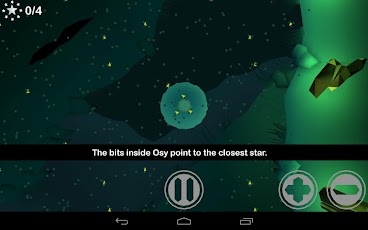
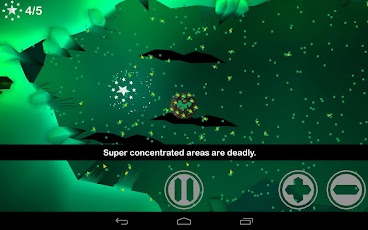
Osy Osmosis is a fun, educational game where you help Osy stay safe as she navigates through a very cool world collecting stars. The trick is to use osmosis to keep her in balance.

The game is not free ($1.99) but is very good, very fun, and educational. It was developed by researchers and educators and profits go towards creating other educational games.


It could be used as a great way to help teach osmosis in a fun way.


Osy Osmosis HD - IS3D-Online Android app on Google PlayAndroid app on Amazon


Read More
Posted in apps for education, biology, chemistry, educational games | No comments
Newer Posts Older Posts Home
Subscribe to: Posts (Atom)

Popular Posts

  • Google+ - what is it and how to get started using it
    Google+ is Google's social network and it has become my preferred social network. Facebook has gotten too political, although I do use...
  • Free Virtual Labs to use in science class
    Virtual Labs is a collection of 4 virtual labs from South Dakota State University (SDSU) and New Mexico State University (NMSU). The 4 virt...
  • Any.do to-do list app available on Android, & now iPhone and Chrome browser
    Any.do is a very popular, free to-do list app for Android and it has just been released for iPhone and the Chrome browser. It is simple to ...
  • Adobe Announces $1 Million scholarship for High School Seniors
    Adobe Foundation Announces New Million Dollar Creativity Scholarship Higher Education Scholarships to Focus on Unlocking Creative Potential ...
  • How Google Builds its Maps
    Google Maps are a great resource in many ways. Obviously, they are great for plotting trips and getting directions and the mobile versions ...
  • Technology I'm using daily as a School District CIO
    This past November I started a new chapter in my career and became the Chief Information Officer (CIO) for the district I was a teacher in ...
  • Lessonopoly - free lesson resources, connect with other teachers
    Lessonopoly is a great, free educational resource cite created to help teachers, with input from teachers. The site has lesson plans and le...
  • Edmodo and Common Sense Media release free Digital Citizenship resource for Educators
    Digital Citizenship is an important topic and something that we must teach our students ( and ourselves ) in today's digital world. Ed...
  • Update on InstallFree Nexus and Rndr - work great on a Chromebook!
    Earlier today I wrote about InstallFree Nexus and Rndr , apps that allow you to use other apps, like LibreOffice and Java, on any device. He...
  • Zoho Planner being shut down
    Zoho Planner is a service I wrote about this past April that was a very useful way to get organize and plan out your schedule and activitie...

Categories

  • 21st century resources
  • 21st century skills
  • 9-11-01
  • administration
  • adobe
  • Adobe Acrobat Reader
  • adobe creative cloud
  • Adobe Digital School Collection
  • Adobe Education Exchange
  • Adobe photoshop
  • adobe touch
  • anatomy
  • Android
  • angry birds
  • animals
  • animation
  • animoto
  • ap physics
  • Apple
  • apps
  • apps for education
  • art
  • assessment
  • astronomy
  • authentic
  • automate
  • aviary
  • aviary falcon
  • awards
  • back to school
  • backchannel
  • behavior
  • binder clips
  • biology
  • blogger
  • blogs
  • bloom's taxonomy
  • bookmark
  • box.net
  • business applications in education
  • CAD
  • calendar
  • cell animation
  • cellphones in school
  • celly
  • charts
  • chemistry
  • chrome browser
  • chromebooks
  • CIO
  • citelighter
  • class dojo
  • classroom management
  • classroom resource
  • clearly
  • Cloud Computing
  • cloud file storage
  • cloud storage
  • cms
  • collaboration
  • college resources
  • college textbooks
  • community
  • computer science
  • computer tips
  • computer training
  • conference
  • contest
  • corporate support
  • course management
  • CPEP
  • CPR
  • create free PDF files
  • create website
  • crocodoc
  • daily technology
  • demonstrations
  • DEN
  • denny awards
  • digital citizenship
  • digital literacy
  • digital textbooks
  • Discovery Education
  • Discovery Educator Network
  • disease
  • DNA/Genetics
  • document camera
  • documents
  • Donors Choose
  • doodle 4 google
  • drawing
  • dropbox
  • e portfolios
  • e-textbooks
  • earth day
  • earth science
  • edcamp
  • edmodo
  • edreform
  • edtech
  • edublogs
  • education
  • educational
  • educational games
  • educational leadership
  • educational reform
  • educational technology
  • educator resources
  • educlipper
  • Edudemic
  • edutecher
  • effective teacher
  • embed files
  • emergency preparedness
  • employment
  • ems
  • end of the year
  • engineering
  • english
  • engrade
  • environmental
  • eportfolios
  • Evernote
  • evernote schools
  • evernote trunk
  • evernote. cloud computing
  • facebook
  • fax
  • feedly
  • field trips
  • file backup
  • file conversion
  • file share
  • file sharing
  • file sync
  • financial
  • financial literacy
  • firearms safety
  • flash cards
  • foreign language
  • forensics
  • forums
  • free alternatives
  • free conference
  • free e-textbooks
  • free magazine
  • free online courses
  • free resources
  • free resources for students
  • free software
  • free technology
  • free technology for teachers
  • funding
  • gafe
  • GCT
  • genetics
  • geography
  • get organized
  • gmail
  • google
  • google applications
  • Google Chrome
  • google Chrome OS
  • Google Docs
  • Google docs in the classroom
  • google doodle
  • google drive
  • google education
  • google for
  • Google for Educators
  • google groups
  • google maps
  • Google Play
  • google plus
  • google sites
  • google teacher Academy
  • google+
  • grade book
  • grants
  • graphics editing
  • graphing calculator
  • great ideas
  • GTA
  • guest post
  • guest speaker
  • gun safety
  • handwriting
  • health
  • Heart
  • History
  • hurricane sandy
  • ideals
  • igoogle
  • image editing
  • infographics
  • insurance
  • interactive whiteboard
  • internet safety
  • internet search
  • internet use
  • internship
  • iOS
  • iPad
  • iste
  • IWB
  • job search
  • keep
  • labs
  • learning management system
  • lesson plans
  • lesson resources
  • libreoffice
  • lifehacker
  • literature
  • livebinders
  • livescribe
  • lms
  • make school relevant
  • markup
  • martial arts
  • math
  • media sources
  • mentoring
  • merge PDF files
  • Microsoft
  • Microsoft Office
  • Microsoft Office alternatives
  • mimio
  • mindmapping
  • mobile learning
  • money
  • most popular posts
  • multimedia projector
  • multimedia projects
  • mythbusters
  • NASA
  • national geographic
  • nature
  • new teacher advice
  • news
  • nexus 7
  • notes
  • notetaking
  • online calculator
  • online conference
  • online course
  • online meeting
  • Online Tech Tips
  • online textbook
  • organization
  • outlook
  • paperless
  • PBL
  • pbs
  • pdf
  • pedagogy
  • personal learning network
  • photo editing
  • photos
  • photoshop
  • physics
  • pinterest
  • plagiarism
  • planner
  • PLN
  • polling
  • PowerPoint
  • prepare for college
  • presentation
  • Prezi
  • printer
  • product review
  • productivity
  • professional development
  • programming
  • project based learning
  • puzzle
  • QuickOffice
  • quizzes
  • reading
  • reference
  • reflection
  • remote control
  • research
  • Richard Byrne
  • rockets
  • rss feed
  • save money
  • scholarships
  • school cio
  • science
  • science fair
  • science resources
  • science simulations
  • science videos
  • scientific calculator
  • screen capture
  • screen recording
  • search
  • signature
  • sikorsky
  • skitch
  • sliderocket
  • slideshow
  • smart phone
  • smartpen
  • smartphone
  • smartphone experts
  • social bookmarking
  • social media
  • social network
  • Social Studies
  • software tutorials
  • space education web sites
  • sports safety
  • spreadsheet
  • springpad
  • STEM
  • student information system
  • study aids
  • sugarsync
  • tablet
  • task manager
  • teach paperless
  • teacher appreciation
  • teachers
  • Tech and Learning Magazine
  • tech support
  • tech tips
  • tech training videos
  • techbook
  • techforum
  • techlearning
  • technology
  • technology help
  • text messaging
  • tips and resources
  • to do list
  • tours
  • training
  • twitter
  • unconference
  • unit conversion
  • video
  • video conferencing
  • video conversion
  • video editing
  • videos
  • virtual
  • virtual conference
  • virtual science
  • virus
  • water safety
  • web 2.0
  • Web Applications
  • web based image editing
  • web browser
  • web clipping
  • web search
  • website
  • whiteboard
  • Windows OS
  • wolfram
  • Wolfram Alpha
  • worksheets
  • worth ave group
  • writing
  • YouTube
  • zoho

Blog Archive

  • ▼  2013 (37)
    • ▼  November (5)
      • Google+ - what is it and how to get started using it
      • LiveMinutes - Edit your Evernote notes in real-tim...
      • Financial Literacy Resources for Students
      • Google announces 5 New GAFE Courses for Teachers a...
      • Google launches Google Connected Classrooms with V...
    • ►  October (3)
    • ►  September (1)
    • ►  August (2)
    • ►  July (1)
    • ►  June (3)
    • ►  May (6)
    • ►  April (3)
    • ►  March (1)
    • ►  February (7)
    • ►  January (5)
  • ►  2012 (463)
    • ►  December (12)
    • ►  November (10)
    • ►  October (36)
    • ►  September (57)
    • ►  August (25)
    • ►  July (13)
    • ►  June (64)
    • ►  May (122)
    • ►  April (119)
    • ►  March (5)
Powered by Blogger.

About Me

Unknown
View my complete profile